Building a Lead Funnel Without a CRM
Gathering potential lead information shouldn't be a huge project...here's my lean implementation.
Where this started
My website has pages for services, a blog, case studies, and a contact form. It's - if I may say so myself - a professional-looking site. But until recently, it wasn't actually doing anything for the business.
My LinkedIn company page receives inbound messages, but I find that most of them are irrelevant, either offering office equipment supplies, or requesting Microsoft training, and one memorable request for some brickwork. LinkedIn Premium is required just to view most of them, which feels like I might end up paying just to view and delete spam. And until now, the company site contact form had no qualification process. It was a text box and a submit button, which is an open door to anything dropping into my inbox.
For my use case, I did consider some third party options, and briefly looked at HubSpot. However there was a capacity mismatch: I don't receive the volume of requests that would make good use of what HubSpot offers. Right now, pipeline stages or lead scoring or automated drip campaigns are a little overkill for my purposes. What I really want to know is what someone wants before I decide whether to reply.
Choosing a clear path
I spent a while thinking about this in terms of lead qualification and conversion funnels before realising the core issue was more fundamental: there was no clear pathway through the site. Visitors would arrive and see six offerings. Not necessarily bad, but there wasn't any guidance on which was relevant to them. No route from "I have a problem" to "I've told Gordon about it." They could read things, maybe hit the contact form. But this wasn't a unified, directed process.
My original plan was to add UTM tracking to the existing contact form but after planning it, I realised that still left me with the same problem, in that everything arrives with no context, no qualification, no signal about intent.
Landing pages per intent
The thing that made the biggest difference wasn't adding a chatbot. It was making specific pages that were targeted to client needs.
Someone searching "hire fractional CTO UK" and someone searching "senior Laravel developer" are different people with different problems, different vocabulary, likely different organisational levels. Showing them both the same services page wasn't paying off, so I built /hire/fractional-cto and /hire/senior-developer as dedicated landing pages. I'll likely end up building more as I examine the inbound traffic.
The CTO page talks about strategy, team direction, and other important C-level issues, such as preparing for investment. The developer page talks about stacks, code quality, and delivery. The same case studies (MedAscend, SUMAC), provide insight in different ways depending on the angle they are viewed from. It was encouraging to see the impact I've made by looking at the work through different lenses - sometimes you get lost in the woods while in the work, and move on so quickly there's no time given for retrospection.
I'm still not sure whether these pages will rank in search, but the LinkedIn angle works immediately: I can link to the relevant page in posts rather than dropping people on a generic homepage.
To keep things clean, the links to the pages aren't in the main navigation. They're landing pages, so the footer contains the links, giving them SEO signal without cluttering the nav. Whether that's a good shout long-term, I don't know. I'll see what the traffic data says once I have enough of it.
The chat widget
I didn't want a form as they can quickly drive potential leads away. Forms are passive and tend to not be too useful unless the person is articulate and motivated. Most people write two sentences, and then submit.
My approach was to build a conversational widget which has the appearance of being smart, but without the overhead of a full-fledged AI agent. It's a scripted decision tree in Alpine.js, about 180 lines of JavaScript total. The flow is: pick a category, answer two guided questions (buttons), type a brief description, then timeline and budget.
The guided button questions are what make it work. Instead of "describe your situation" (which is far too open ended), it asks things like "How big is your current dev team?" with four options. This primes them to think concretely before the free text field appears. The free text prompt is also specific to their category rather than generic.
The first version actually asked three guided questions. Testing showed the third added very little and made the whole thing feel like a survey, so it was removed - simplicity is almost always better, especially when there's uncertainty.
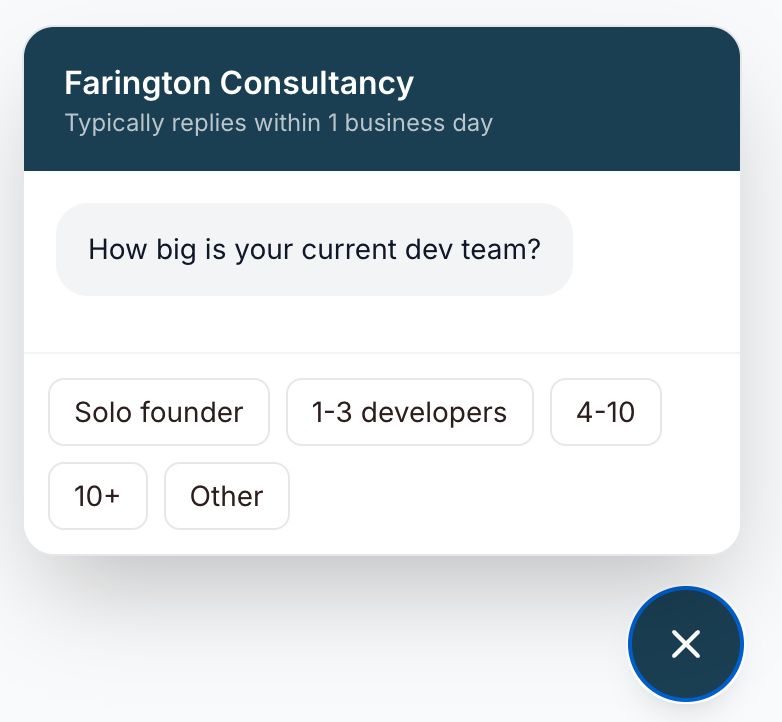
Speaking of simplicity, I've always found it frustrating when the chat is seemingly clueless about my context on sites that I've visited. I want it to know why I visited and what I'm looking at when I open it. On the landing pages, the widget skips the category selection entirely as we've made an educated guess about intent. If you've landed on /hire/fractional-cto, I already know what you're interested in.
Getting it to actually send emails
This was a wee bit messier than expected. Statamic's form system handles everything: storing submissions, sending email notifications, input validation. What I had was an existing reCAPTCHA listener running on all form submissions that silently blocked the chatbot's POST (no reCAPTCHA token present = rejected). The API response said "success": true, "submission_created": false, which for a time was a confusing outcome.
Instead, I tried bypassing Statamic's form pipeline entirely. The widget POSTs to a plain Laravel route (/lead) that validates, writes a YAML file, and sends a branded HTML email via SES. No event listeners, no form middleware, nice and simple.
Or so I thought... After getting it working, and having had my morning cup of coffee, I realised the bypass was overkill and there was likely a reasonably simple fix for the reCAPTCHA, and it turned out there was. I moved it back to Statamic's native form system - submissions stored by Statamic, visible in the CP, with a SubmissionCreated event listener handling the branded email. It was nice to leverage what I knew was a solid setup in Statamic. Clarity sometimes requires a pause, and some backtracking.
As expected, this was just half the battle: email clients are notoriously finicky, and getting the HTML email to render in Protonmail wasn't an exception. Style blocks in the head get stripped. Everything needs to be inline. Tables, not divs...fortunately I could depend on my AI workflow for this gruntwork!
What arrives in my inbox
A formatted email with:
- Each guided question and their answer, clearly separated
- The free text response
- Timeline and budget
- Which page they were on when they opened the widget
- UTM source and campaign from the URL
- Referring page
- A reply button pre-addressed to them
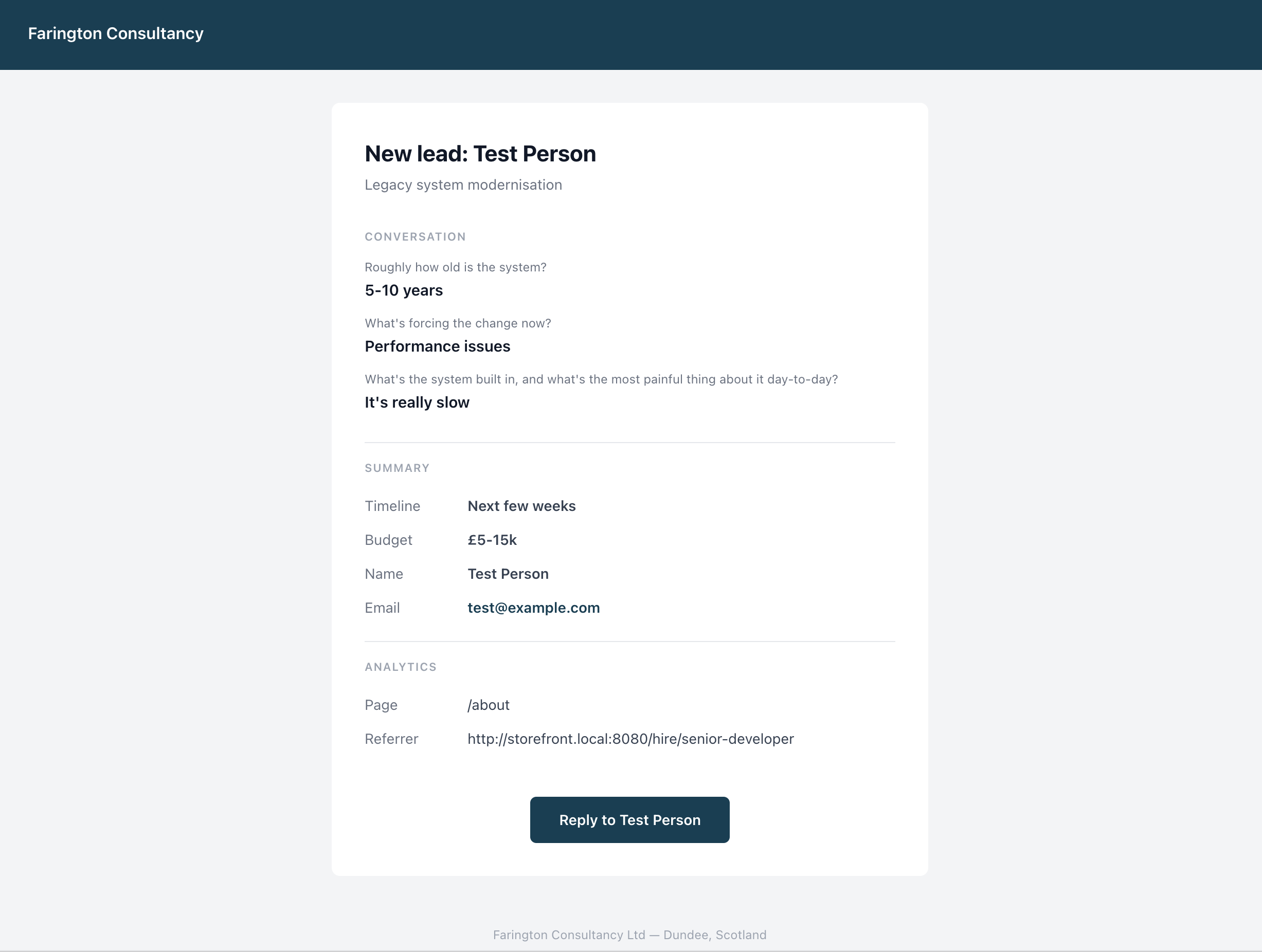
That last bit is nice, adding in the Reply-to saved a bit of time. I can respond directly from my inbox without copying addresses or logging into anything.
What I'm tracking
Umami fires events for chat-opened, lead-captured, and book-call-clicked. Combined with UTM parameters on my LinkedIn posts, I can see which posts drive traffic, which pages people engage with, and whether the funnel actually converts. Whether I have enough traffic to draw meaningful conclusions is something I'll need to find out in time.
Cost
AWS SES at this volume: effectively zero. The whole thing runs on infrastructure I already had. Alpine.js was already loaded. No new dependencies, no monthly subscriptions, no per-seat pricing.
What I haven't solved yet
Umami can't currently capture geolocation because of how Podman's bridge networking handles IP forwarding. Real client IPs get lost. I'm waiting to upgrade the server to Ubuntu 25.04 LTS which ships Podman 5 with pasta networking. Then I'll be able to get a bit of insight into where folks are from when they land on my site.
I don't have drop-off data per step yet as it's early days. I know when someone opens the chat and when they submit, but I can't see where they abandon mid-conversation. I'll be adding this over the next few weeks.
The blog posts shown on landing pages are just the latest three rather than filtered by topic relevance. This bugs me, so will be updated soon to allow this.
I still don't know if the landing pages will outperform the service pages in search. The theory is sound (specific intent targeting, unique content, distinct keywords) but I won't have data for a few months - watch this space.
The stack, if you're interested
Statamic 5 (free tier), Laravel 12, Podman containers, Nginx, Umami 3.1 (self-hosted, PostgreSQL), AWS SES, GitHub Actions for deployment. The chat widget is pure Alpine.js. Storage is YAML flat files. Four containers total. Runs on a single VPS.